| |
Meicheng CMX-12 high definition
HD/SD digital AV Mixer
Video Effects HD/SD Digital AV Mixer CMX-12 |
|
|
|
|
| |
CMX-12 high
definition HD/SD digital AV Mixer MV : |
|
| |
|
|
| |
CMX-12 is a high
definition digital AV Mixer, which is a simple type of HD/SD
Video Mixer Editor to switch and effects. Each input BUS supports
6 inputs (2 x HDMI, 2 x Component, 2 x S-Video and Composite
video) and also Background Color for special effect. The output
supports 1 x HDMI, 2 x Component, 2 x S-Video and Composite
video, CMX-12 HD AV Mixer also supports position adjustment
and recording. The output supports HD/SD resolution for example,
NTSC, NTSC-4.43, PAL, PAL-M, PAN-N, SECAM, 480p, 576p, 720p
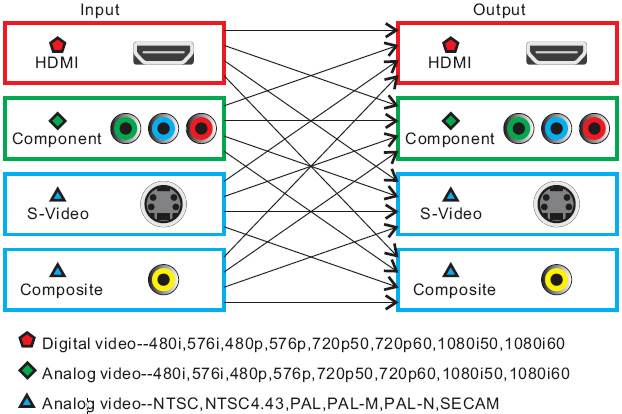
50/60, 1080i 50/60. The output can automatically adjust to
consistency resolution, please refer to the diagram on the
right side. |
|
| |
|
| |
|
| |
|
|
|
| ·
Selective size and position for digital effects area and PIP. |
·
1 HDMI recording outputs. |
| · Automatic
fade and wipe with speed preset control. |
· 2 Component
recording outputs. |
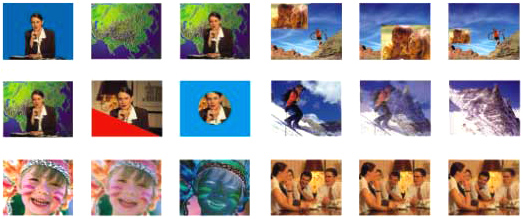
| · Digital
effects- Still, Mosaic, Paint, Negative. |
· 1 Composite
Video / S-Video recording output. |
| · 96
wipe patterns. |
· 1 Composite
Video / S-Video monitoring output (OSD). |
| · Chroma
key & Luminance key. |
· Auxiliary
audio input. |
| · High
Picture Quality. |
· Microphone
input / headphone output. |
| · 3x8
back color.(3 frames,8 colors). |
· Picture
in Picture control. (3 window sizes) |
| · Joystick
control for digital effect position. |
· Each
A/B BUS can adjust independently. |
| · Fade
control for Video and Audio. |
· Supports
Lip-Sync delay up to 170ms. |
| · Video
and Audio mixing. |
· Motion
and Edge Adaptive De-interlacing. |
| · 2 HDMI
/ Component / Composite Video/S-Video inputs. |
· Composite
supports 3D comb filter and YC separation. |
|
| |
|
| Source Input |
 |
HDMI Input: x2 Digital Video
YUV (480i/p ,576i/p , 720p50/60 , 1080i50/60) |
|
Component Input: x2 Analog Video YUV (480i/p
, 576i/p , 720p50/60 , 1080i50/60). |
|
| Y/C input: x2 Y signal: |
1.0 Vp-p 75Ω , Mini Din
4-pin connector |
| |
C signal: 0.3 Vp-p 75Ω , Mini Din
4-pin connector |
|
|
| Video input: |
x2 1.0 Vp-p 75Ω composite
signal , Pin-Jack |
| |
(NTSC , NTSC4.43 , PAL , PAL-M , PAL-N
, SECAM) |
|
|
| Audio input: |
x4 -6 dBs/20 kΩ Pin Jack
(L/R). |
|
|
| External Sound Input |
|
MIC input: x1 (MIC) ; -60 dBv/600Ω. |
|
AUX input: x1 (AUX) ; -6 dBs/20 kΩ , Pin
Jacks(L/R). |
|
| Recording Output |
|
HDMI Output: x1 Digital Video
YUV (480i/p , 576i/p , 720p50/60 , 1080i50/60). |
|
Component Output: x2 Analog Video YUV (480i/p
, 576i/p , 720p50/60 , 1080i50/60) |
|
| Y/C Output: x1 Y signal: |
1.0 Vp-p 75Ω , Mini Din
4-pin connector |
| |
C signal: 0.3 Vp-p 75Ω , Mini Din
4-pin connector |
|
|
| Video Output: |
x1 1.0 Vp-p 75Ω composite
signal , Pin-Jack |
| |
(NTSC , NTSC4.43 , PAL , PAL-M , PAL-N
, SECAM) |
|
|
| Audio Output: |
x2 -6 dBs/20 kΩ Pin Jack
(L/R). |
|
|
| Preview Output (OSD) |
|
| Y/C Output: x1 Y signal: |
Y/C Output: x1 Y signal:
1.0 Vp-p 75Ω , Mini Din 4-pin connector |
| |
C signal: 0.3 Vp-p 75Ω , Mini Din
4-pin connector |
|
|
| Video Output: |
x1 1.0 Vp-p 75Ω composite
signal , Pin-Jack |
| |
(NTSC , NTSC4.43 , PAL , PAL-M , PAL-N
, SECAM) |
|
|
| Headphone Output |
|
1x (Headphone); -20 dBv~ -80 dBv, 3.5 mm
phone jack |
|
| Effects |
|
| Video: |
Still, Mosaic , Paint
, Negative , Wipe, Mix, Fade , Picture-In-Picture
, Chroma key , Luminance key |
|
|
| Back Color 3x8 |
|
3 frames, 8 colors |
|
| Wipe Patterns |
|
96 patterns |
|
| S/N (Typical) |
|
Video: 48 dB (composite) , 50 dB (HDMI ,Component
,Y/C) ; Audio: 60 dB |
|
| Power Source |
|
12V DC 3A , Approx. 15W |
|
| Power Consumption |
|
Approx. 15W |
|
| Dimensions/ Weight |
|
267(W) X 370(D) X 103.5(H) mm , / 2Kgs |
|
|
| |
|
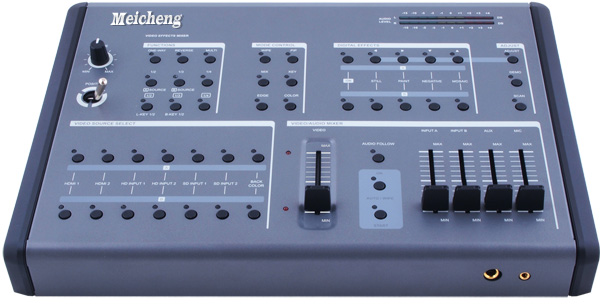
|  Major
Operating Controls and Their Functions: Major
Operating Controls and Their Functions:
|
|
■ POSITION/ TIME |
|

|
|
① Time Control : For adjusting the transition
time of Auto Fade function and Auto take function.
② Joystick control : This joystick control
has two functions controls the position of the Square wipe pattern
and
 P-IN-P
picture. P-IN-P
picture.
|
|
|
■ FUNCTIONS |
|

|
|
③ One-way wipe button.
④ Reverse wipe button.
⑤ Multiple wipe button.
⑥ Straight wipe button.
⑦ Split wipe button.
⑧ Corner wipe button.
⑨ Diagonal wipe button.
⑩ Triangle wipe button.
⑪ Square wipe button.
|
|
■ MODE CONTROL |
|

|
|
⑫
Wipe button : For selecting the wipe effect.
⑬
PIP button : Picture in picture mode can be selected by pressing this button.
⑭
Mix(Fade) button : Press this button to select the fade In/Out mode.
⑮
KEY button : This button allows you to tune in a best performance point for
the blue key and luma key effects.
⑯
EDGE button : Press WIPE button, can select sharp edge / soft edge or color
edge.
⑰
COLOR button : Press color edge, can select eight different color of frame.
|
|
■ DIGITAL EFFECTS |
|

|
|
 |
|
| ■ ADJUST |
|

|
|
 |
|
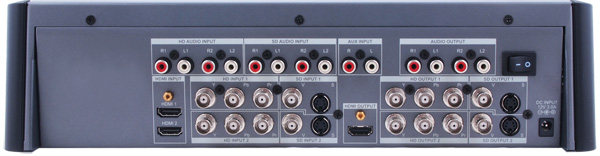
| Connector
and Installation: |
|
 |
| |
|
■ The output can
select HD or SD system. Users can use SD PREVIEW to adjust the output
system, or a fast way to switch is to press two keys for 1 second
in the same time. |
|
|